Welcome to
HAKO METAL Genesis
The World's First Quantum-Resistant ABEL-Nakamoto ASIC Miner
HAKO METAL Genesis is a compact, ultra-low-power (15–20 W) ASIC miner purpose-built for the Abelian Mainnet. Designed from the ground up for home use, it combines silent operation, rock-solid stability, and class-leading efficiency with sleek and industrial-looking style.
With just the power draw of a light bulb, you can now run real ASIC hashrate at home — helping secure Abelian’s groundbreaking hybrid, quantum-resistant Proof-of-Work network while earning ABEL mining rewards.
This guide will walk you through quick setup, best practices, and everything you need to start mining meaningfully and contribute to true decentralization — right from your desk.
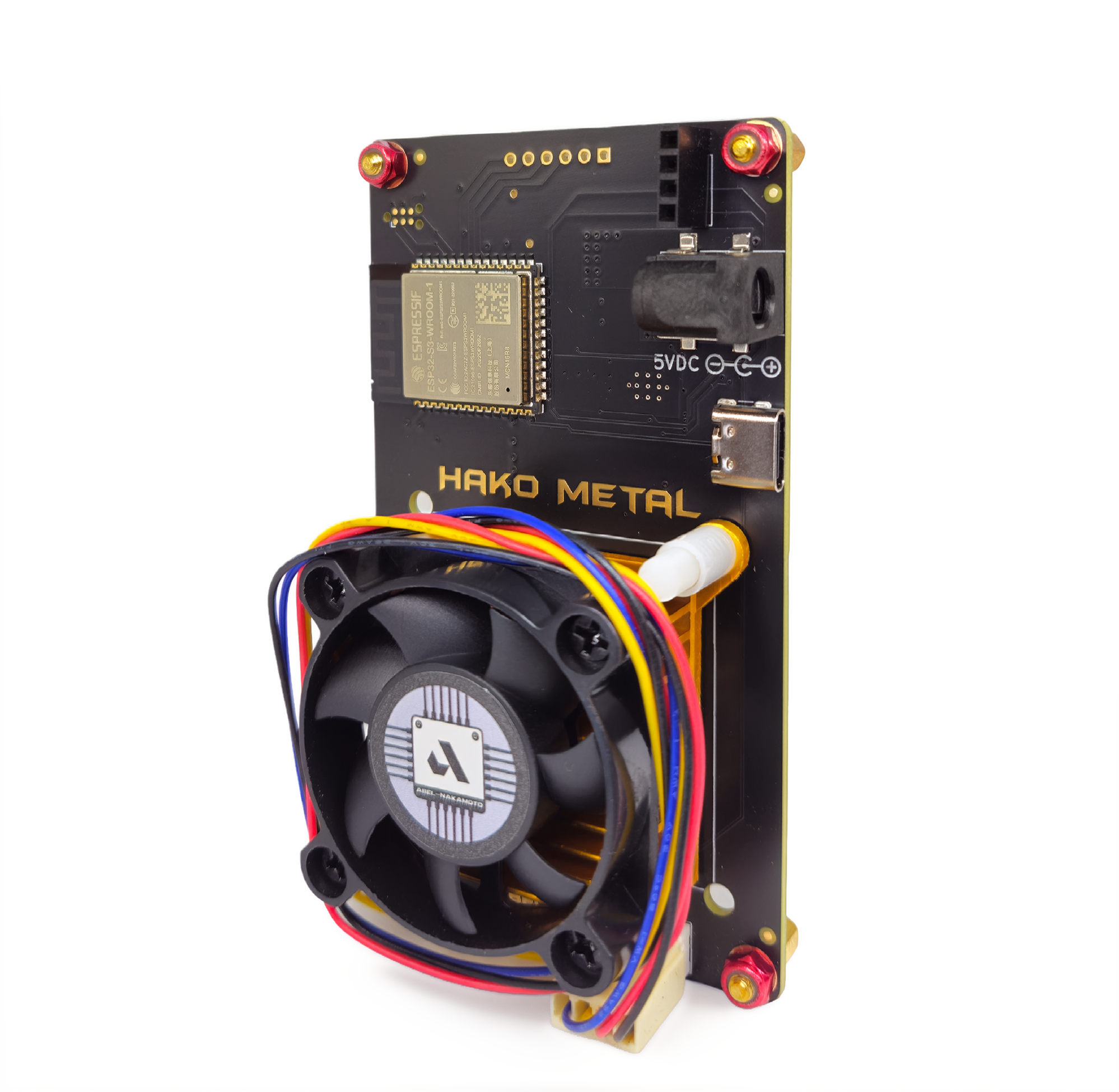
HAKO METAL Genesis —
the world’s first quantum-resistant ASIC miner.
Ultra-efficient (15–20 W), compact, silent, and born in the Abelian lab, it puts real ASIC hashrate directly in your hands — right on your desk.
Designed for everyday people, not data centers. Runs like a light bulb — no crazy electricity bills. Fully quantum-resistant from day one. Powers Abelian’s hybrid PoW (ASIC + GPU friendly) for maximum decentralization. Helps secure a privacy-first, post-quantum Blockchain network.
No technical wizardry needed. Just plug in, connect via WiFi, and start contributing meaningful hashrate — while earning ABEL rewards.
HAKO METAL Genesis Home mining. True decentralization. Post-quantum security.
The future of crypto starts in your living room.

Prerequisites
Get these ready before you start mining with HAKO METAL Genesis:
➤ HAKO METAL Genesis device
➤ 12V Power adapter (included with your device, or use a compatible one)
➤ Abelian wallet address
• Download the official Abelian mobile app
• Copy your ABEL receiving address
➤ Stable Wi-Fi network (the miner connects wirelessly — no Ethernet needed)
HAKO METAL Genesis User Guide:
Step 1: Power On the Miner
- Connect the OLED screen to the miner board (if it is not already attached).
- Plug the 12V power adapter into the miner.
- After powering on, in about 20 seconds, the screen will display WiFi SSID.
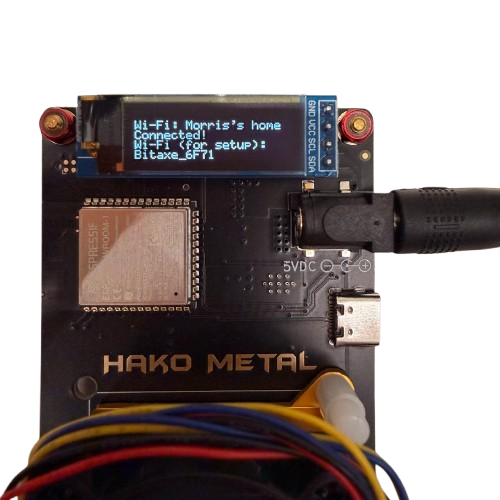
Step 2: Connect to the Miner’s Wi-Fi Hotspot
- On your phone or computer, go to Wi-Fi settings.
- Look for a network named HAKOMETAL_XXXX (XXXX will be random digits).
- Connect to this network. A setup page will pop-up automatically.

Step 3: Configure Wi-Fi Connection
In the pop-up window, navigate to Network at the left panel of the window.
Enter your home WiFi SSID (2.4GHz only) and password.
Click Save and then Restart.
The machine will restart and connect to your home WiFi.
The OLED screen will display an IP address.
Important: From now on, the machine will automatically reconnect to your home WiFi network whenever it powers on.
Step 4: Register on ABEL-NAKAMOTO Mining Pool
On your computer, visit https://abel-nakamoto.xyz/
Register and go to Settings, and clock Add Account.
Fill in the form:
- Tag (Name): Example: myABELminer
- Description (Optional): Example: My ABEL mining machine
- Wallet Address: Copy your ABEL wallet address from your Abelian mobile app and paste here.
Click Submit.
- Username (a long string like d892a6c1...)
- Password (another string).
Once added, you will see your pool credentials, including:
Copy both values, Username and Password, for the next step.
Step 5: Link the Miner to Your Pool Account
Make sure your computer is connected to the same WiFi network as the mining machine.
Open a web browser (e.g. Google Chrome)
Enter the mining machine's IP address displayed on the OLED screen,http://192.168.1.112
Go to the Pool Setting tab.
Fill in the Username and Password.
Click Save and Restart.
Step 6: Monitor Mining Rewards
The miner is now mining. Mining Rewards are calculated based on the shares contributed to the pool.
Log in to https://abel-nakamoto.xyz/account/dashboard
You can view:
- Current Balance (unpaid ABEL)
- Total Mined
- Payout history
- Estimated next payout
Default payout threshold: 5 ABEL
Once your balance reaches 5 ABEL, the pool will automatically send the rewards to your wallet.
You can verify transactions on the explorer: https://explorer.pqabelian.io
Tips & Troubleshooting
➤ No Wi-Fi hotspot appears
Press and hold the BOOT button for 5–10 seconds to force hotspot mode.
➤ IP address changed
Check the OLED screen for the latest IP.
➤ Hashrate is 0 or no shares
- Check the Logs tab.
- Verify Username and Password.
- Ensure your Wi-Fi signal is stable.
➤ Security
Never share:
• Pool username/password
• Wallet private keys
For further assistance, please contact:
hello@pqabelian.io
Happy mining! 🚀