HAKO METAL 指南

逐块開鑿數位黃金 2.0

HAKO METAL 是一款專為 Abelian 主網設計的小型低功耗 ASIC 礦機,特別適合家庭規模的挖礦。它擁有時尚的金屬外殼,兼具節能、靜音和穩定的性能。用戶可以在積極參與 Abelian 網路安全的同時,獲得挖礦獎勵。
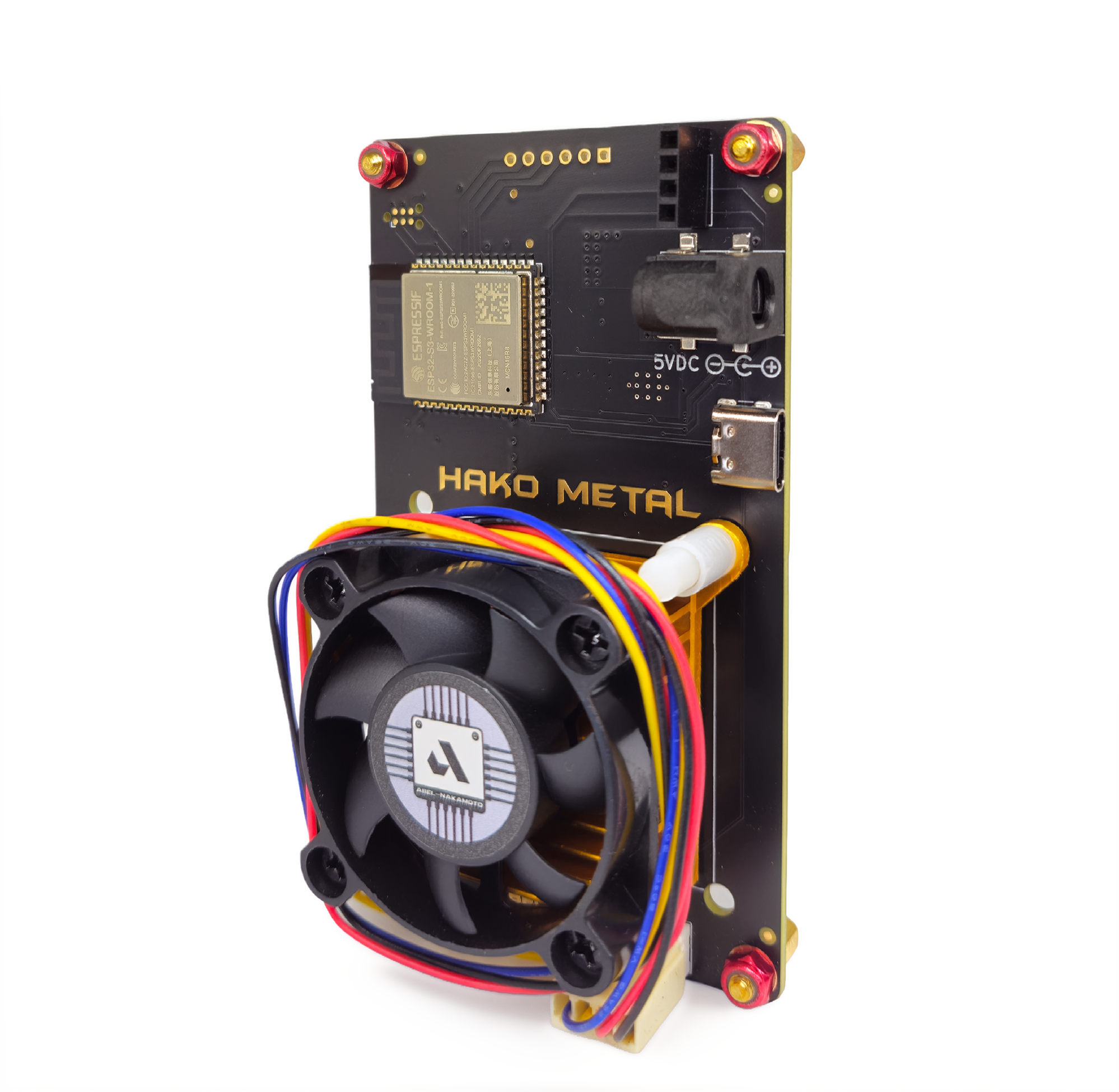
HAKO METAL

為後量子時代打造的 ASIC 礦機

HAKO METAL 旨在提高效率、便利性以及後量子時代的韌性,使個人能夠直接從家中參與保護 Abelian L1 網絡。

立即入手您的 HAKO METAL

必備條件

在開始之前,請準備以下內容:

➤ HAKO METAL 設備

• 包括內建螢幕、散熱風扇和電源

➤ 12V 電源供應器

• 設備隨附或提供相容轉接器


➤ Internet-connected device

• 具備 Wi-Fi 功能的智慧型手機、平板電腦或計算機

➤ 阿貝爾錢包
• 安裝 Abelian 桌面錢包或移動應用錢包以取得您的 ABEL 錢包位址
(可從官方網站 pqabelian.io 或可信賴的社群連結下載)

➤ 穩定的Wi-Fi網絡

• 礦工連接礦池所必需

HAKO METAL 設定教學:

在 ABEL-NAKAMOTO  礦池中挖礦 ABEL

本指南將引導您設定 HAKO METAL 帳戶,以便使用 ABEL-NAKAMOTO 礦池開始挖礦 Abelian 代幣 ($ABEL)。整個過程大約需要 10-15 分鐘。

步驟一:啟動礦機

1. 將 OLED 螢幕連接到礦機主機板(如果尚未連接)。

2. 將 12V 電源轉接器插入礦機。

3. 確保極性正確,以免損壞。

通電後:

• 螢幕會亮起

• 風扇將開始旋轉

• 10-30秒後,螢幕將顯示關鍵訊息,包括:

◦ 層主機(池位址)

◦ 本地 IP 位址(例如:192.168.x.x)

提示:拍下螢幕截圖,以便日後輕鬆找到 IP 位址。

步驟二:連接礦工的Wi-Fi熱點

1. 在手機或電腦上,進入 Wi-Fi 設定。

2. 尋找名為 Bitaxe_XXXX 的網路(XXXX 將是隨機數字)。

3. 連接此網路。

• 無需密碼。

如果它沒有自動開啟設定頁面,請開啟瀏覽器並造訪:http://192.168.4.1http://192.168.1.112

步驟三:設定 Wi-Fi 連接

在 AxeOS 控制面板 Web 介面中:

1. 設定主機名稱(例如,MyBitaxe 或 MyMiner)。

2. 選擇或手動輸入您的家庭 Wi-Fi SSID(僅限 2.4GHz)。

3. 輸入 Wi-Fi 密碼(區分大小寫)。

4. 點選儲存或應用。

挖礦程序將重新啟動並連接到您的家庭 Wi-Fi。

• 等待 1-2 分鐘。

• OLED 螢幕現在將顯示路由器指派的新 IP 位址(例如,192.168.1.112)。

重要提示:從現在開始,礦機每次開機都會自動重新連線到此 Wi-Fi 網路。

步驟四:在 ABEL-NAKAMOTO 礦池註冊

開啟瀏覽器並造訪:https://abel-nakamoto.xyz/

1. 註冊新帳戶

2. 登入後,進入設定

3. 點選「新增帳戶」

請填寫表格:

標籤(名稱):

例如:ASIC 挖礦或 Bitaxe1

描述:可選

例如:我的家用Bitaxe礦機

錢包地址

從您的桌面或移動應用錢包貼上您的 ABEL 錢包位址。

建議:為了保證挖礦相容性,請使用較長的錢包地址。

長地址:通常超過 2000 個字符,以 abe1 或 0001 開頭

短地址:66 個字元(可能有效,但對於礦池來說,長地址更安全)

點選「新增」或「儲存」。

新增後,您將看到您的池憑證,包括

• 使用者名稱(類似 d892a6c1… 的長字串)。

• 密碼(另一個字串)。

下一步,請複製使用者名稱和密碼這兩個值。

步驟五:將礦機關聯到您的礦池帳戶

請確保您的電腦或手機與礦機連接到同一個 Wi-Fi 網路。

1. 打開瀏覽器。

2. 輸入OLED螢幕上顯示的礦機IP位址,例如:

http://192.168.1.112

3. 轉到「礦池」標籤。

請填寫以下欄位:

• Stratum Host:pool.abel-nakamoto.xyz(通常預先填充/不可更改)

• Stratum Port:3333(不可更改)

• 使用者:貼上您在礦池帳戶中的使用者名稱(您也可以選擇新增類似 .Bitaxe1 的工作者名稱,以便於追蹤)。

• 密碼:貼上您的密碼

• 建議難度:保留預設值(通常為 1000),或根據您的算力在 500 到 2000 之間調整。

4. 點選「儲存」→「重新啟動」(或「重新啟動」)。等待1-5分鐘。

5. 返回「儀表板」標籤:

• 檢查哈希率(應該大於 0,例如,在你的情況下為 500+ GH/s)。

• 已接受股份(應開始增加)。

步驟六:監控挖礦獎勵

礦工正在進行挖礦,挖礦獎勵依據對礦池的貢獻份額來計算。

登入 https://abel-nakamoto.xyz/account/dashboard 以:

您可以查看:

• 當前餘額(未付ABEL)

• 總開採量

• 支付歷史記錄

• 預計下次付款

預設支付門檻:

5個 ABEL

一旦您的餘額達到 5個 ABEL,獎金池將自動將獎勵發送到您的錢包。

您可以在交易瀏覽器上驗證交易:https://explorer.pqabelian.io

技巧與疑難排解

➤ 未顯示 Wi-Fi 熱點

按住 BOOT 按鈕 5-10 秒,強制進入熱點模式。

➤ IP 位址已更改

請查看OLED螢幕上的最新IP位址。

➤ 算力為 0 或無份額

• 查看「日誌」標籤

• 驗證使用者名稱和密碼

• 確保您的 Wi-Fi 訊號穩定

➤ 溫度

保持礦機溫度低於65°C。

• 在設定中啟用自動風扇控制。

安全

永遠不要分享:

• 池用戶名/密碼

• 錢包私鑰

➤ 盈利情况監控

追蹤網路算力和挖礦數據:

explorer.pqabelian.io
whattomine.com/coins/397-abel-abelhash

This guide walks you through setting up your HAKO METAL to start mining Abelian ($ABEL) using the ABEL-NAKAMOTO Mining Pool. The process takes about 10–15 minutes.
Step 1: Power On the Miner
  1. Connect the OLED screen to the miner board (if it is not already attached).
  2. Plug the 12V power adapter into the miner.
  3. Ensure the polarity is correct to avoid damage.

Once powered on:

  • The screen will light up.
  • The fans will start spinning.
  • After 10–30 seconds, the screen will display key information, including:
    • Stratum Host (pool address)
    • Local IP Address (example: 192.168.x.x)

Tip: Take a photo of the screen so you can easily reference the IP address later.

Step 2: Connect to the Miner’s Wi-Fi Hotspot
  1. On your phone or computer, go to Wi-Fi settings.
  2. Look for a network named Bitaxe_XXXX (XXXX will be random digits).
  3. Connect to this network. No password is required. If it doesn’t auto-open a setup page, open a browser and go to: http://192.168.4.1 or http://192.168.1.112.
Step 3: Configure Wi-Fi Connection

In the AxeOS dashboard web interface:

  1. Set a Hostname (e.g., MyBitaxe or MyMiner).
  2. Select or manually enter your home Wi-Fi SSID (2.4GHz only).
  3. Enter the Wi-Fi password (case-sensitive).
  4. Click Save or Apply.

The miner will restart and connect to your home Wi-Fi:

  • Wait 1–2 minutes.
  • The OLED screen will now display a new IP address assigned by your router (e.g., 192.168.1.112).

Important: From now on, the miner will automatically reconnect to this Wi-Fi network whenever it powers on.

Step 4: Register on ABEL-NAKAMOTO Mining Pool

Open a browser and go to: https://abel-nakamoto.xyz/

  1. Register a new account.
  2. After logging in, go to Settings.
  3. Click Add Account.

Fill in the form:

  • Tag (Name): Example: ASIC mining or Bitaxe1
  • Description (Optional): Example: My home Bitaxe miner
  • Wallet Address: Paste your ABEL wallet address from your desktop or mobile wallet.

Recommended: Use the long wallet address for mining compatibility.

  • Long address: Usually 2000+ characters, starting with abe1 or 0001.
  • Short address: 66 characters (may work, but long addresses are safer for mining pools).

Click Add or Save.

Once added, you will see your pool credentials, including:

  • Username (a long string like d892a6c1…).
  • Password (another string).

Copy both values, Username and Password, in the next step.

Step 5: Link the Miner to Your Pool Account

Make sure your computer or phone is connected to the same Wi-Fi network as the miner.

  1. Open a browser.
  2. Enter the miner’s IP address shown on the OLED screen, for example: http://192.168.1.112
  3. Go to the Pool tab.
    Fill in the following fields:
    • Stratum Host: pool.abel-nakamoto.xyz (usually pre-filled/immutable)
    • Stratum Port: 3333 (immutable)
    • User: Paste your Username from the pool account (You may optionally add a worker name like .Bitaxe1 for easy tracking)
    • Password: Paste your Password
    • Suggested Difficulty: Leave as default (usually 1000) or adjust between 500–2000 based on your hashrate.
  4. Click Save → Restart (or Reboot). Wait 1–5 minutes.
  5. Go back to the Dashboard tab:
    • Check Hash Rate (should be >0, e.g., 500+ GH/s in your case).
    • Accepted Shares (should start increasing).
Step 6: Monitor Mining Rewards

The miner is now mining. Mining Rewards are calculated based on the shares contributed to the pool.

Log in to https://abel-nakamoto.xyz/account/dashboard

You can view:

  • Current Balance (unpaid ABEL)
  • Total Mined
  • Payout history
  • Estimated next payout

Default payout threshold: 5 ABEL
Once your balance reaches 5 ABEL, the pool will automatically send the rewards to your wallet.
You can verify transactions on the explorer: https://explorer.pqabelian.io

Tips & Troubleshooting

➤ No Wi-Fi hotspot appears
Press and hold the BOOT button for 5–10 seconds to force hotspot mode.

➤ IP address changed
Check the OLED screen for the latest IP.

➤ Hashrate is 0 or no shares

  • Check the Logs tab.
  • Verify Username and Password.
  • Ensure your Wi-Fi signal is stable.

➤ Temperature
Keep the miner below 65°C.
• Enable Automatic Fan Control in settings.

➤ Security
Never share:
• Pool username/password
• Wallet private keys

➤ Profitability monitoring
Track network hashrate and mining data:
explorer.pqabelian.io
whattomine.com/coins/397-abel-abelhash


  • ‍‍‍
恭喜!
您的 HAKO METAL 礦機現已成功設置,並在 ABEL-NAKAMOTO 礦池上挖礦 $ABEL。

如需進一步協助,請聯絡:
hello@pqabelian.io

挖礦愉快! 🚀

攜手迎戰量子威脅

阿貝爾鏈賦能下一代區塊鏈,保護交易、資產與資料免受量子攻擊。

立即體驗阿貝爾鏈

阿貝爾鏈打造後量子時代的未來

阿貝爾鏈是旨在抵禦量子威脅的第一層區塊鏈。美國國家標準與技術研究所 (NIST) 已批准多種基於格子密碼演算法,用於抗量子加密和數位簽章。憑藉抗量子密碼學、多層隱私保護以及高度去中心化,阿貝爾鏈為您的區塊鏈提供當前及未來的安全與隱私保障。

加入我們的團隊